Wait - What happened to Notepad++?
Notepad++ is more than 20 years old, and since tech years are dog years, that makes it mega-old. For the unfamiliar, Notepad++ is a popular text, code, and general file editor. I would guess most developers have crossed paths with NPP (as its friends call it) at some point. Maybe to edit a config file, open a CSV, tweak some code in an unfamiliar environment, or just because it was already installed on whatever Windows machine you had at the time.
Recently, news broke that Notepad++ was hijacked by state-sponsored hackers.
Wait... what? What a bizarre headline. Let’s dig into the details.
Traffic Hijacking
In December 2025, the Notepad++ team announced an update saying users had reported suspicious activity caused by traffic hijacking on Notepad++’s update servers. Womp womp. That is not good.
Traffic hijacking is exactly what it sounds like. It's when you think you are sending a request to one place, but it actually gets routed somewhere else without your knowledge or consent. For example, you make a request to visit your bank's website, but the request is intercepted and routed to an attacker-controlled destination. The scary part is that users often have zero visibility that anything unusual happened.
In the case of Notepad++, traffic for software update requests was being rerouted to malicious servers. Those servers then delivered malicious executables disguised as legitimate updates.
And once you've installed an unknown piece of software on your machine, all kinds of bad stuff can happen, but we'll get into that a bit later.
Crash Course on Update Security
Notepad++ uses a tool called WinGUp (Windows Generic Updater) to handle updates. WinGUp was originally created as a bespoke tool specifically to maintain updates for Notepad++.
WinGUp, and pretty much all software updaters, generally follows a pretty standard public-key encryption trust pipeline:
-
The vendor (Notepad++, in this case) builds a new release.
-
The release is signed using the vendor’s private key and published to an update server (https://notepad-plus-plus.org/update/... in this case).
-
The vendor publishes update metadata saying, “Hey, a new version exists.”
-
The client reads the update metadata file, and downloads the update.
-
The client verifies that the update it retrieved matches the signature published by the vendor. It does this by using the vendor’s public key, which is either shipped inside the application itself, included in the metadata, or distributed another way ahead of time. The client also verifies the legitimacy of the update metadata file itself using a similar mechanism.
As long as the downloaded content matches against the vendor’s public key, you know two things: the update actually came from the publisher, and it hasn’t been tampered with.
Or at least... That’s how it’s supposed to work.
Trouble in Paradise
Let’s take a look at an example update metadata file from Notepad++. Pretty standard stuff: version numbers, update location, signatures, and all that jazz.
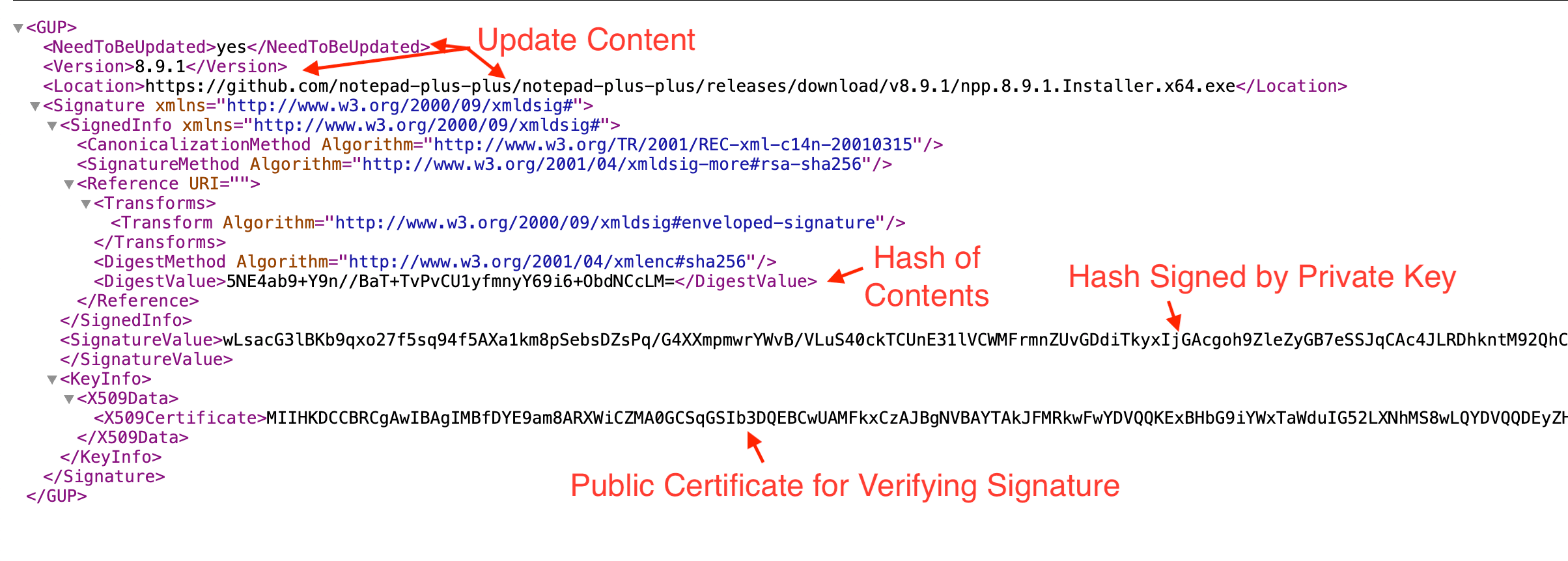
This file is what WinGUp uses to update a local Notepad++ environment.
The story of Notepad++'s recent troubles starts here, with CVE-2025-15556. CVE, for the unfamiliar, stands for Common Vulnerabilities and Exposures. It is a database maintained by government and nonprofit organizations to document known security bugs. This particular CVE describes:
"An update integrity verification vulnerability where downloaded update metadata and installers are not cryptographically verified."
What this means is that, if your traffic was hijacked, a bad actor could return their own metadata file containing a link to a malicious package and trick WinGUp into downloading and executing it. This is possible because, while WinGUp verified that downloaded content (both update metadata and installers) was cryptographically signed, it did not properly verify that those signatures belonged specifically to the Notepad++ project.
You can check out the fix discussion here if you're into that kind of thing. In short, it adds proper verification to the signature and certificate of downloaded installers during the update process.
Okay, so Notepad++ wasn’t verifying signatures totally correctly (and here's even a bit of a kerfuffle about Notepad++'s certificate authority anyway, so it's easy to see how this slipped through the cracks). But where does the actual breach come in?
After reports surfaced of traffic hijacking and suspicious update behavior from devices later confirmed to be infected, Notepad++ conducted an internal investigation. They discovered their update infrastructure (the server responsible for hosting the update metadata files) had been compromised starting September 2, 2025, with attackers maintaining access until December 2, 2025.
This meant the attackers could serve completely legitimate-looking update metadata files from official infrastructure. And since the client wasn't verifying the signature authorities, WinGUp would trust whatever the update metadata file said. Extremely ungood. And that's exactly what happened, traffic from certain users was selectively redirected to attacker-controlled update manifests in order to install malicious executables.
So that’s the chain of events: a longstanding oversight in the Notepad++ update software failed to validate signatures on update metadata, combined with a breach of the update infrastructure, allowed attackers to distribute malicious updates that were then downloaded and executed.
Whodunnit
If you updated or installed Notepad++ during the period when attackers had access to the update servers, your environment might have been affected. That said, according to Notepad++, most users were probably safe:
"This was a highly selective attack by a state-sponsored group targeting specific high-value organizations. Security researchers confirmed that the vast majority of Notepad++ users were never affected - attackers filtered victims based on strategic value, not random distribution."
An excellent, in-depth analysis of the exploit was published by cybersecurity firm Rapid7, who has dubbed this exploit "Chrysalis." Rapid7 was able to prove that Chrysalis, if installed, could perform reconnaissance, exfiltrate data, and do all kinds of other bad stuff.
Attribution points to a Chinese state-sponsored APT (Advanced Persistent Threat) group called Lotus Blossom (sick name, if we're being honest). Attribution of the attack to this group is based on the targeted users and similarities between the backdoor used in Notepad++ and previous attacks attributed to Lotus Blossom.
Conclusion
The lesson? I’m not sure. Stay frosty out there. Make sure to check your supply chain if you are up to important or sensitive business.
And maybe consider putting your coffee maker and fridge in airplane mode, you know... just in case.
The team at /dev/null Digest is dedicated to delivering human-written commentary, humor, satire, and insights about software development and the tech world. Have opinions to share? Interested in writing your own articles? We are always accepting submissions, so feel free to reach out.
Related Posts


By posting you agree to our site's terms and conditions , ensuring that we can create a positive and respectful community experience for everyone.